Enhanced Merchant
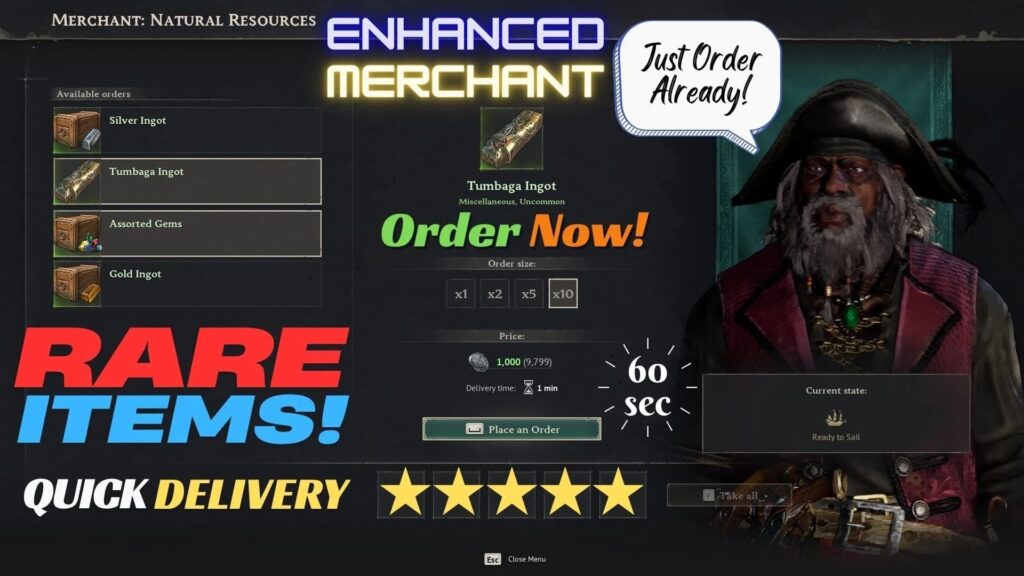
If you have been playing Windrose and finding yourself frustrated by slow merchant arrivals, a limited selection of buyable materials, and an economy that forces you to endlessly reroll your world hunting for ruins and treasures, then the Enhanced Merchant mod is precisely what your pirate base has been missing. This complete guide to the Windrose Enhanced Merchant mod covers everything you need to know, from what the mod actually does and why it was built, to a full breakdown of its features, its progression-locked inventory system, its known compatibility considerations, and a step-by-step walkthrough for downloading and installing it correctly. Windrose itself is one of the most exciting pirate survival games to hit Early Access in years, launched with over 1.5 million wishlists and 22,000 concurrent players on day one, blending Valheim-style base building with Souls-lite stamina combat and full naval warfare across procedurally generated open-world islands. The game’s trading system, however, has always been a point of friction. Merchants visit on long timers, the default inventory leans heavily on basic resources like Fiber, Wood, and Stone, and genuinely useful semi-finite materials like Gold, Silver, and Tumbaga Ingots require either boss progression or world exploration grinding to obtain in meaningful quantities. The Enhanced Merchant mod directly addresses all of that, overhauling the base merchant into a genuinely useful and time-efficient trading post.
What Is Windrose?
Windrose is a PvE co-op pirate survival game set in an alternative Age of Piracy, developed by Windrose Crew and available on Steam. Players begin shipwrecked after an encounter with Blackbeard and must gather resources, build a land base, craft gear, recruit crew members, repair and upgrade their ship, and eventually sail into large-scale naval combat across procedurally generated biomes.
The gameplay loop blends land-based survival crafting with stamina-driven melee and ranged combat, boss encounters, ship boarding sequences, and a deep progression system that unlocks new tools, weapons, and production buildings over time. It supports up to eight players in co-op with both self-hosted and dedicated server options.
What Is the Enhanced Merchant Mod?
The Enhanced Merchant mod is a gameplay overhaul for the base merchant in Windrose, created by modder christianwidjaya. It cuts the merchant’s arrival timer down to 60 seconds and replaces the default inventory listings for basic resources with a curated selection of semi-finite progression materials, including Silver Ingots, Gold Ingots, Tumbaga Ingots, and assorted gems such as Sapphires and Rubies.
The mod was designed not as a cheat but as a legitimate grind replacement. Rather than forcing players to reroll their world repeatedly to find ruins and buried treasures, it lets them farm Piastres through naval combat and then spend those earnings at the base merchant on the rare materials they actually need. It is one of the most recommended quality-of-life mods in the Windrose community and has been featured on multiple best-mods lists since release.
Mod Features
Faster Merchant Arrival Timer
The most immediately noticeable change is the arrival timer. The default merchant visit interval is reduced to just 60 seconds, meaning you no longer need to wait extended periods between restocking or selling runs. This alone makes the base trading experience dramatically more fluid, especially during active farming sessions.
Upgraded Inventory Listings
The mod replaces the default Fiber, Wood, Stone, and Bark listings in the Resource Merchant with a proper selection of semi-finite materials. These are items that matter for mid-to-late game crafting and upgrading, things the vanilla merchant never offered in any meaningful way. Here is the full inventory breakdown based on progression:
Available Immediately:
- 1x Tumbaga Ingot (Resource Merchant)
Unlocks After Defeating the First Boss:
- 5x Gold Ingot (Resource Merchant)
- 10x Silver Ingot (Resource Merchant)
- 10x Sugarcane (Food Merchant)
Unlocks After Defeating the Second Boss:
- Assorted Gems, one of each type (Sapphire, Ruby, and more)
Bonus Bundles for Replaced Items
The original basic resources that were removed from the standard listing are still obtainable through bundled purchase options:
- Buying Divi Logs grants 50 Hardwood, 50 Wood, and 25 Bark
- Buying 50 Sulfur grants 50 Stone as a bonus
- Buying 30 Flax Fiber grants 50 Fiber as a bonus
- Buying 30 Corn grants 5 Corn Seeds as a bonus
Sugarcane Addition
Sugarcane was added by community request. Despite the base game files suggesting it should be purchasable in Tortuga, it currently cannot be bought there. The mod adds it to the Food Merchant at the original in-game price of 3 Piastres per unit, stacked to 10 per crate.
Known Compatibility Notice
The Enhanced Merchant mod is currently known to conflict with other mods that modify the same merchant values. If you are running a modded Windrose setup, it is recommended to check for conflicts manually before installing. The mod does not perform automated conflict detection, so the responsibility falls on the player to verify compatibility with the rest of their mod list.
The good news is that the mod is save-file safe. It modifies existing merchant script entries rather than adding new ones, which means it can be removed at any time without corrupting your saves. This design choice was intentional, as adding new entries instead of modifying old ones carries a risk of breaking save files if the mod is later uninstalled.

Download the Enhanced Merchant Mod
You can download the mod in the following link:
How to Install the Enhanced Merchant Mod
Installation is straightforward and follows the standard Windrose mod installation process. Follow the steps below based on your play setup:
Single Player and Dedicated Server
- Download the Enhanced Merchant Mod from Modsportal
- Extract the downloaded archive
- Navigate to your Windrose game directory
- Place the extracted
.pakfile into the following folder:R5\Content\Paks\~mods - If the
~modsfolder does not exist, create it manually - For dedicated server setups, repeat this process on the server itself in the same directory path
Multiplayer via Hosted Sessions
In addition to the single player steps above, also extract the mod files into:R5\Builds\WindowsServer\R5\Content\Paks\~mods
Both the client and the server need the mod installed for it to function correctly in a hosted multiplayer environment.
Tumbaga Display Bug
One known visual quirk to be aware of: Tumbaga currently displays as a standard item rather than a crate in the merchant interface, because the game does not have a dedicated Tumbaga crate icon. If you see the green “Tumbaga” listing and click it once without receiving anything, click it a second time. The actual Tumbaga Ingot will appear in blue and be added to your inventory correctly. This is a game-side limitation and not a mod error.