More Slots In Backbag
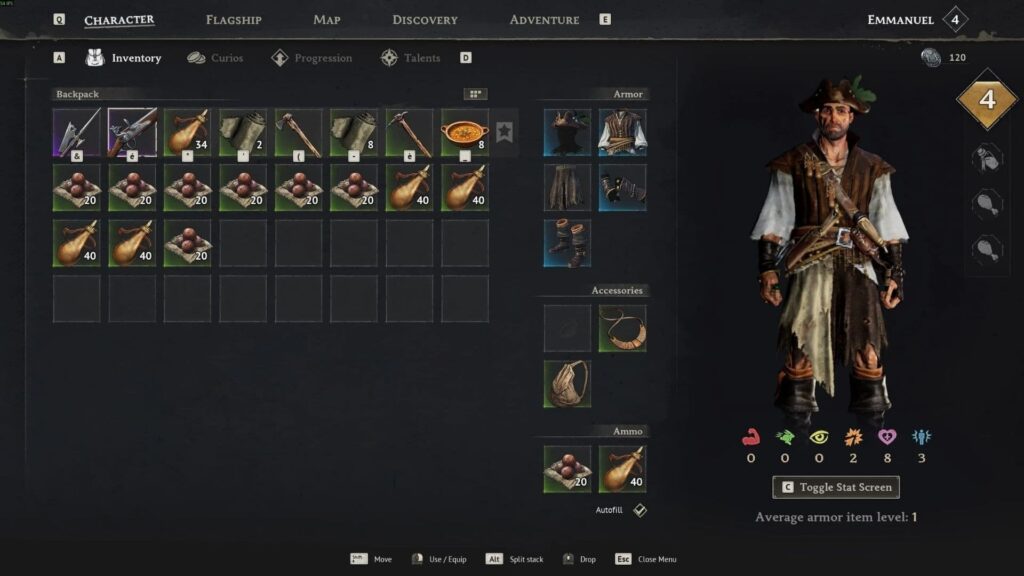
If you are looking for a practical Windrose inventory mod that improves carrying capacity without overhauling the whole game, More Slots in Backbag is an easy recommendation. This Windrose mod expands backpack storage for the demo’s available bags, making inventory management smoother for players who are tired of constant item juggling, base trips, and limited bag space during exploration. Specifically, the mod triples the slot count of the Torn Sailcloth Bag and the Sailor Backpack, turning the first from 4 slots into 12 and the second from 8 slots into 24, which gives you far more room for resources, crafting materials, and loot gathered across your adventure in Windrose.
Because inventory space is one of the most noticeable pressure points in survival and exploration games, a backpack slot expansion like this can make the overall gameplay loop feel more relaxed and efficient. Instead of stopping frequently to sort, discard, or return home with a full bag, you can stay focused on gathering, building, and traveling longer. For players who enjoy quality-of-life improvements, this mod fits neatly into a lightweight setup that respects the core feel of Windrose while removing one of its most common inconveniences.
More Slots In Backbag Mod Features
- Triples the number of slots for the demo’s available back bags in Windrose.
- Increases the Torn Sailcloth Bag from 4 slots to 12 slots.
- Increases the Sailor Backpack from 8 slots to 24 slots.
- Helps reduce frequent inventory cleanup and repeated trips back to storage.
- Keeps the mod focused on storage convenience rather than changing combat, progression, or visuals.
This makes the mod especially useful for players who spend a lot of time farming materials, collecting loot, or crafting on the move.

Where To Download More Slots In Backbag
The official source for this mod is its dedicated page on ModsPortal.
How To Use It
After installing the mod, you need to refresh the equipped bag so the new slots activate correctly. To do that, remove the back bag from its equipped slot, place it into an empty inventory slot, and then equip it again.
This extra step is important because the added storage does not appear automatically on an already equipped bag. Once re-equipped, your updated backpack space should be available for use in Windrose.