More Stacks
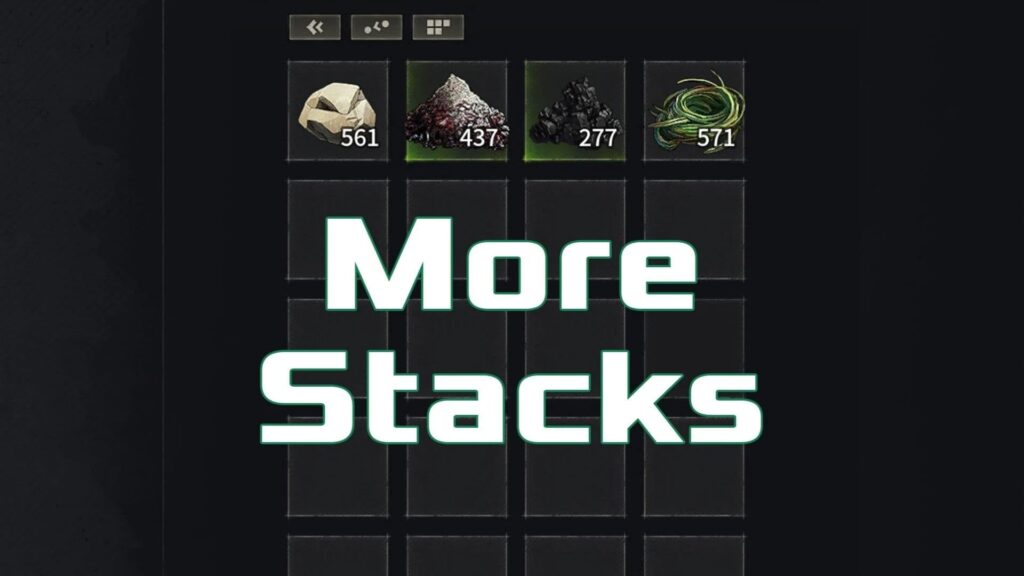
In the evolving sandbox world of Windrose, where resource management, crafting efficiency, and survival strategy define the player experience, the MoreStacks mod has quickly become a favorite among players who want less restriction and more control. The keyword MoreStacks represents more than just a quality-of-life tweak, it signals a major shift in how players interact with inventory systems in Windrose. By increasing stack limits from 2x up to an impressive 1000x, this mod eliminates the constant frustration of inventory clutter, frequent storage trips, and unnecessary micromanagement. Whether you are deep into exploration, base-building, or large-scale resource farming, MoreStacks reshapes gameplay pacing and allows you to focus on what truly matters in Windrose, creativity and progression.
What More Stacks Mod Does
At its core, MoreStacks enhances the default item stacking system. Instead of being limited by the base game’s constraints, players can now carry significantly larger quantities of materials, tools, or consumables in a single slot.
This change might sound simple, but it has a noticeable impact. Mining runs last longer, crafting sessions feel uninterrupted, and inventory management becomes far less tedious. It is the kind of improvement that quietly transforms the overall gameplay loop without breaking immersion.
Where to Find More Stacks Mod
If you are looking to expand your Windrose experience even further, Modsportal is a great place to start. You can browse and download a wide range of mods, including MoreStacks, directly from
It is a convenient hub for discovering new gameplay enhancements, whether you are focused on performance tweaks, visual upgrades, or major gameplay changes.
Installation
Installing MoreStacks is straightforward and does not require advanced setup.
After downloading the mod, extract its contents into the correct directory. If the ~mods folder does not exist, you can create it manually.
- Single Player: Windrose\R5\Content\Paks~mods
- Multiplayer: Windrose\R5\Builds\WindowsServer\R5\Content\Paks~mods
Once placed correctly, the mod should be active the next time you launch the game.
Custom Versions
One of the strengths of the MoreStacks mod is its adaptability. If the default scaling options do not fit your playstyle, you can request a custom version.
This makes it ideal for both casual players and those running specific server setups who need precise balancing.